Actuarial Regulation Assistant: Why RAG Is the Right Approach for LISF and CUSF
Interpreting LISF and CUSF means navigating articles that cross-reference each other across laws, and a Ctrl+F can't tell the article defining technical reserves from one that mentions them in passing. AI makes it possible to absorb that entire volume without losing a single detail. This agent uses RAG to index every article individually with a cross-reference graph, eliminating citation hallucinations and ensuring the model only reasons over real legal text. The result is an assistant that amplifies the actuary's memory without replacing their judgment.
LISF and CUSF are the complete regulatory framework for the insurance and surety sector in Mexico. Together they span over a thousand articles, and the complexity isn’t just in the volume: it’s in the dependencies. LISF article 121 talks about technical reserves, but to understand which reserves and how, you need the CUSF Title 5 provisions. A solvency article points you to three provisions on eligible own funds, which in turn reference valuation criteria in another title. An actuary who has studied both laws thoroughly still forgets details, still needs to search “which provision covered portfolio transfer”. That’s the nature of the document: too extensive, too interconnected to hold entirely in human memory.
This makes actuarial regulation a perfect use case for a language model. An LLM can have the full corpus available, never forgets an article, and can reason about relationships between provisions. The question isn’t whether to use AI for this, but how to do it without the system making things up.
The problem with conventional search
Ctrl+F in a PDF searches for text strings. If you search “technical reserves”, you get every mention in the document, with no distinction between the article that defines technical reserves and the thirty articles that mention them in passing. There’s no notion of regulatory relevance, no contextual weighting, no way to know that article 121 is the one that actually matters.
For an actuary who already knows where to look, this works. For queries where you don’t remember exactly which title had that provision, Ctrl+F is insufficient.
The first version: hallucinations and slowness
The initial version was straightforward: load LISF chapters as text files, pass them to the model, and ask. The result was predictable. The model fabricated article numbers with total confidence. It cited “Article 247” when the relevant article was 201. Responses were slow because the system scanned 275 files line by line with regular expressions. And worst of all: there was no way to verify whether a citation was real without going to the original PDF.
The root problem is that the model has no structured access to the information. Without a search mechanism that delivers the correct articles, the model fills gaps with its general knowledge, and its general knowledge of Mexican regulation is imprecise.
RAG: search first, reason second
Retrieval-Augmented Generation inverts the flow. Instead of asking the model to remember, you give it a search engine that finds the relevant articles first. The model receives actual legal text and reasons over it. If the search system finds article 121 when you ask about technical reserves, the model cites 121 because it’s reading it, not because it’s inventing it.
RAG quality depends entirely on retrieval quality. If search fails, the model receives irrelevant articles and produces irrelevant answers (but with real citations, which is better than fabricated ones). The heavy lifting is in building an index that returns the correct articles.
The methods that make the system work
Per-article indexing, not per-chapter
The original version indexed 273 chapter files. A CUSF chapter can contain 82 provisions, all sharing the same 10 keywords. When you searched for “reinsurance”, the system returned the entire chapter and the model had to find the relevant provision within thousands of lines.
The solution was splitting chapters into 2,354 individual files, one per article or provision. Each file has its own frontmatter with specific metadata: law, number, title, chapter, topic, keywords, summary, and cross-references.
BM25 with column weights
Not all columns have equal search value. An article’s title matters more than a casual mention in the body. Keywords, curated specifically for each article, matter more than the title. The system uses SQLite’s FTS5 with differentiated BM25 weights: title x5, text x1, keywords x10, context summary x8. This means an article whose keywords match your query appears first, even if another article mentions the term more often in its body.
Per-article keywords
The original keywords were per-chapter: 82 provisions sharing the same 10 words. That means keyword search was useless for distinguishing one article from another within the same chapter. After enrichment, each article has its own keywords (max 15), and 89.6% of articles have a unique set that differentiates them from the rest. The difference is massive: “portfolio transfer” as a keyword takes you directly to the article regulating transfers, not to a chapter of 50 provisions where transfers are mentioned once.
The enrichment used a multi-model pipeline: Sonnet processed all 2,354 articles extracting keywords and summaries from the actual content; then Opus validated and refined the results grouped by Title, removing generic terms, correcting classifications, and ensuring keywords were discriminating within their regulatory context.
Cross-reference graph
LISF and CUSF constantly reference each other. LISF article 121 points to CUSF provisions on reserves; CUSF provisions reference LISF articles on CNSF authorities. The system extracts and stores 2,882 cross-references in an indexed table. When you search for an article, the system automatically includes its most relevant cross-references in the context passed to the model. This replicates what an experienced actuary does mentally: “if I’m looking at article 121, I also need the CUSF Title 5 provisions”.
Context summaries
Each article has a summary describing in plain language what it regulates and why it matters. These summaries carry x8 weight in search, allowing conceptual queries (like “what are the requirements for eligible own funds”) to find relevant articles even when the exact phrasing doesn’t appear in the legal text.
Results
Retrieval improvements were dramatic. Queries like “internal model for RCS”, which previously returned no relevant articles, now directly find the provisions regulating internal models for the solvency capital requirement. Queries about “eligible own funds” or “technical reserves” return the core articles instead of peripheral mentions. The system went from scanning 275 files with regex (slow, imprecise) to indexed queries responding in milliseconds.
The interface
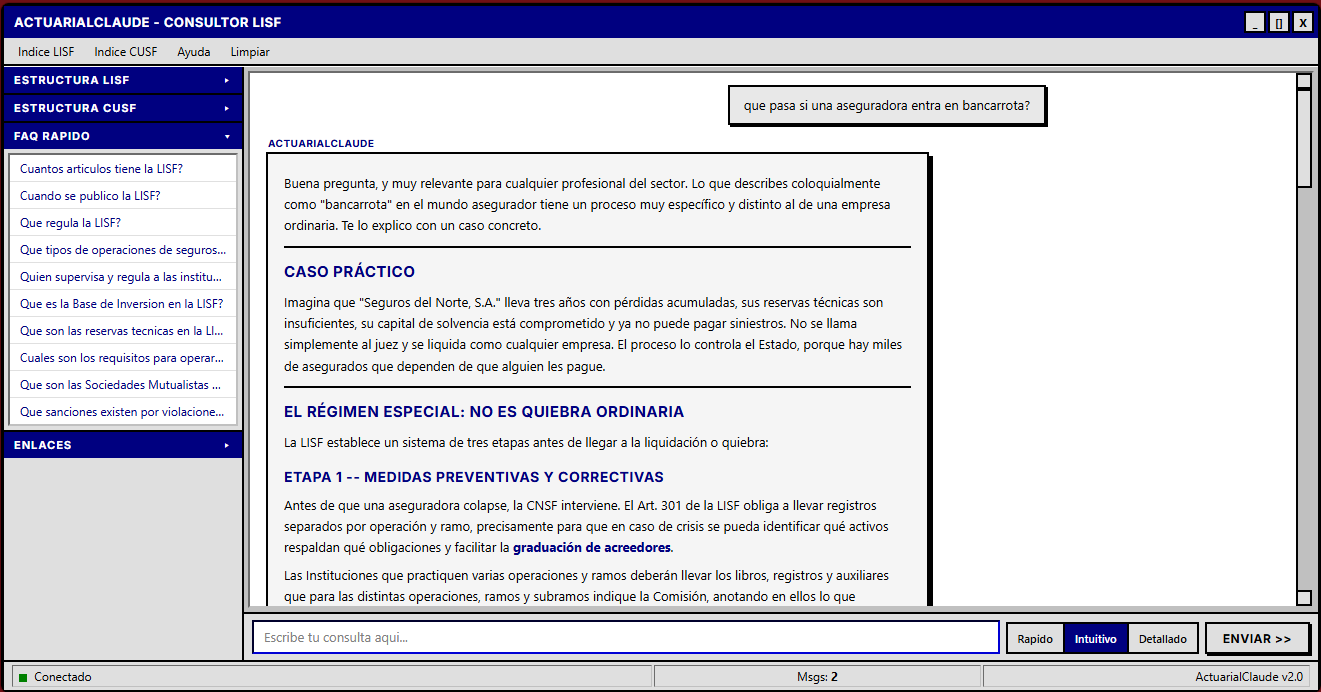
The frontend uses a brutalist design inspired by Windows 98: title bar, menu bar, sidebar with the complete LISF and CUSF structure, and a distraction-free conversation area. The aesthetic is intentional: it’s a work tool, not a pretty demo. The sidebar allows navigation by title and topic, with precalculated quick answers for each section of both laws.
Who this tool is for (and who it’s not for)
This point is fundamental. The assistant is not a substitute for studying LISF and CUSF. It’s not a tool for someone unfamiliar with the regulatory structure: if you don’t know what RCS is, what role technical reserves play, or how CUSF titles are organized, the system’s answers won’t make sense to you.
It’s a tool for actuaries and industry professionals who already understand the regulatory framework and need an assistant to help navigate its complexity. Someone who knows a provision about portfolio transfer exists but doesn’t remember which title it’s in. Someone who needs to quickly verify an article’s cross-references before writing a technical note. Someone reviewing solvency requirements who wants to confirm they’re not missing a relevant provision.
Human judgment remains the most important factor in the equation. The system searches, organizes, and presents. Regulatory interpretation, the decision of how to apply an article to a specific case, that remains the professional’s responsibility. Always.
Connection to other projects
The regulation assistant is complementary to SIMA, which implements capital calculations under LISF (reserves, SCR, commutation functions). While SIMA executes the math, the assistant navigates the regulation that defines which math to apply. It also connects to the Actuarial Suite, which standardizes those calculations in a reusable Python library, and to the life insurance technical note, where LISF and CUSF regulatory requirements are applied to concrete products.
The code is on GitHub and the application is deployed on Google Cloud Run.
actuaria-claude
Open-source version
The main version of the assistant uses Claude through Anthropic’s API, which offers the best response quality but has a per-query cost. For those who want to explore the tool without access restrictions, there is a version deployed on HuggingFace Spaces running Qwen2.5-72B, an open-source model.
The quality difference is real: Qwen handles straightforward queries about specific articles well, but for questions that require reasoning across multiple interrelated provisions, Claude is noticeably more precise. For serious regulatory work, the Claude version remains the recommendation. But for getting familiar with the LISF and CUSF structure, or for quick lookups when budget is tight, the open-source version is a functional alternative with no access code and no usage limits.